

Beginner's Guide to Using a Multimeter: Zero to Hero (Avoid These Common Mistakes)
Why This Guide Exists
Most beginners only use multimeters for basic voltage testing, fearing damage or shock. This guide simplifies multimeter use, teaching you to confidently use all key functions with step-by-step instructions.
You’ll learn:
3-minute multimeter panel recognition
Safe lead placement for all measurements
9 essential functions with clear steps
Critical safety rules and troubleshooting
Maintenance tips for longevity
Part 1: Know Your Multimeter (3-Minute Recognition)
Most DMMs share a basic layout. We use VC890C (beginner-friendly) as an example—principles apply to all major brands.
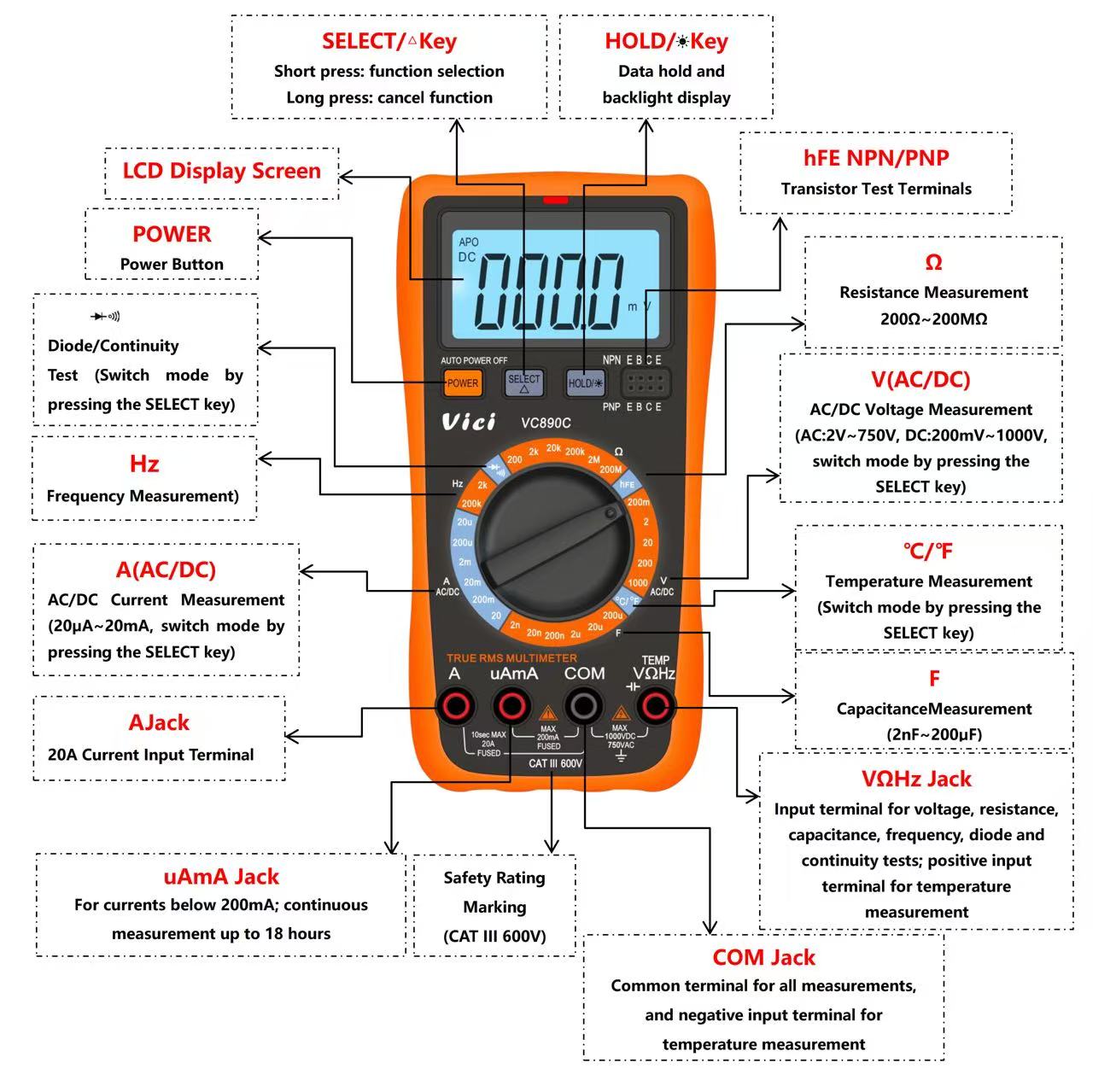
1.1 Four Critical Jacks
Golden Rule: Black lead always in COM (common ground). Red lead moves with the function.
Jack Label | Primary Use | Critical Limit |
COM | Black lead (permanent) | Never move black lead from COM |
VΩHz | Voltage, resistance, capacitance, frequency, diode, temperature | Safe for 90% of tasks |
uA / mA | Small current (DC/AC) | Max 200mA (exceed = blown fuse) |
A | Large current (DC/AC) | Max 20A (<15 seconds per use) |
1.2 Rotary Switch Functions
Quick reference for function symbols:
Function | Measures | Use Case |
AC/DC V | AC/DC voltage | Batteries, outlets, chargers |
Ω (Ohms) | Resistance, continuity | Resistors, open circuits |
Diode  | Diode voltage, continuity | Diodes, PCB traces, shorts |
C / F | Capacitance | Capacitor testing |
Hz | Frequency | Circuits, inverters |
hFE | Transistor gain | Transistor testing |
℃ / ℉ | Temperature (K-type thermocouple) | Heat sinks, soldering irons |
AC/DC A | AC/DC current | Power draw, circuit load |
1.3 Button Functions ( VC890C)
Button | Short Press | Long Press | Use |
POWER | — | On/off (auto-sleep after 15min) | Power control |
SELECT | Switch AC/DC, modes | — | Mode selection |
HOLD | Freeze reading | Backlight (30s) | Reading capture, low-light use |
REL | Zero baseline | — | Accurate readings |
Part 2: 9 Essential Multimeter Functions (Step-by-Step)
Note: Black lead = COM; red lead = VΩHz (unless stated otherwise).
2.1 DC / AC Voltage (V)
Use: Batteries, outlets, chargers (most common function).
Set to ACV (outlets) or DCV (batteries); choose a range higher than the expected voltage (e.g., 250V for wall outlets, 20V for batteries).
Press SELECT for AC/DC (if needed).
Connect leads in parallel to measurement points (red to positive, black to negative for DC; no polarity for AC).
Read display; adjust range if "OL" appears (over-range).
Safety: Max 1000V DC / 750V AC. Never touch probe tips when measuring 220V.
2.2 DC / AC Current (A)
Use: Power draw, charging current (critical wiring!).
Wiring: Small current (<200mA) → uA/mA jack; Large current (200mA–20A) → A jack.
Set to AC/DC A; select a range higher than the expected current.
Press SELECT to choose AC/DC (match the current type).
Disconnect circuit (break current path) to avoid short circuits.
Connect meter in series with the circuit (red to positive side of the break, black to negative side).
Reconnect power and read; disconnect immediately if using 20A range (≤15 seconds).
Never connect current jacks in parallel with voltage sources (blows fuse). 20A = <15 seconds.
2.3 Resistance (Ω)
Use: Resistors, continuity, open circuits.
Set to Ω (start with highest range if unknown resistor value).
Power off circuit and discharge capacitors (critical to avoid meter damage).
Touch leads to resistor ends (polarity doesn’t matter); wait 1–2 seconds for stable reading.
Read display; adjust to lower range for more accuracy if needed.
Notes: >1MΩ readings are slow (normal). “OL” = over-range or open circuit.
2.4 Capacitance (F)
Use: Testing electrolytic/ceramic/film capacitors.
Set to F range; select a range higher than the capacitor’s rated value.
Press REL to zero lead capacitance (eliminates lead interference).
Fully discharge capacitor (critical—use a resistor to discharge high-capacity capacitors).
Connect leads (red to positive, black to negative for electrolytic capacitors; no polarity for non-polarized).
Read display; a reading 10–20% off rated value indicates a faulty capacitor.
Safety: Never measure capacitance on live circuits (destroys meter).
2.5 Diode & Continuity
Use: Diodes, PCB traces, shorts/opens.
Set to diode symbol .
Press SELECT: Diode mode (measures forward voltage) or Continuity (beeps when resistance <50Ω).
Diodes: Red → anode (+), black → cathode (-); reverse leads to check for reverse leakage (should show "OL").
Continuity: Touch leads to wire/trace/solder joint; no beep indicates an open circuit.
Results: Good diode = 0.5–0.7V (forward), “OL” (reverse); Good continuity = beep.
Never apply voltage in this mode (damages meter).
2.6 Temperature (℃/℉)
Requires: K-type thermocouple (red→VΩHz, black→COM).
Use: Heat sinks, motors, soldering irons.
Set to ℃/℉ range.
Connect K-type thermocouple (red/+ to VΩHz, black/- to COM; ensure secure connection).
Touch probe tip firmly to measurement surface (avoid air gaps for accuracy).
Press SELECT to switch between Celsius (℃) and Fahrenheit (℉); wait 2–3 seconds for stable reading.
2.7 Frequency (Hz)
Use: Square waves, PWM, clock signals, inverters.
Set to Hz range; select a range higher than the expected frequency.
Red lead to signal source (e.g., circuit pin), black lead to circuit ground (COM).
Read display; use shielded leads for weak signals to reduce noise and improve accuracy.
Tip: Use shielded leads for weak signals.
2.8 Transistor hFE
Use: NPN/PNP transistor gain testing.
Set to hFE range (ensure meter is set to NPN or PNP, matching the transistor type).
Insert transistor pins into the correct E (Emitter), B (Base), C (Collector) socket holes.
Verify NPN/PNP type matches the meter’s setting (adjust if needed).
Read gain (β) value; typical values range from 20–200 (values outside this range indicate a faulty transistor).
Note: Test conditions: Ib≈15μA, Vce≈1.2V (approximate results).
Part 3: 6 Critical Safety Rules
# | Rule | Consequence |
1 | No voltage measurement in current mode | Blown fuse, meter damage |
2 | No voltage in Ω/diode/capacitance/temperature modes | Internal circuit damage |
3 | No probe tip contact >250V | Electric shock |
4 | 20A measurements <15 seconds | Overheating, damage |
5 | Power off/discharge capacitors for Ω/capacitance | Meter/circuit damage |
6 | Replace low battery immediately | Inaccurate readings, damage |
Part 4: Quick Troubleshooting
Problem | Cause | Fix |
No display | Dead battery, HOLD active | Replace battery, press HOLD/POWER |
No current reading | Blown fuse | Replace with same-spec fuse |
Unstable readings | Low battery, poor probe contact | Replace battery, re-seat leads |
“OL” on display | Over-range, open circuit, charged capacitor | Increase range, discharge capacitor |
Unstoppable beep (continuity) | Probe contact, short circuit | Separate probes, check circuit |
Part 5: Maintenance & Longevity
Keep dry: Store in cool, dry place; avoid wet conditions.
Clean gently: Use damp cloth (no alcohol/solvents).
Correct fuses: Replace with same specs.
Remove batteries: If stored >3 months (prevents leakage).
Handle carefully: Avoid drops/impact.
Part 6: One-Sentence Summary
Black to COM, red follows function. Voltage in parallel, current in series. Power off for resistance and capacitance. High voltage: don't touch tips. Large current: 15 seconds max. Diode and temperature modes: no voltage allowed.
Document Information
Type: Technical tutorial / Beginner's guide
Reading time: 8–10 minutes
Target audience: Beginners, hobbyists, home electricians, technicians
SEO Keywords: multimeter guide for beginners, how to use a digital multimeter, DMM functions, multimeter safety, Vicimeter VC890C tutorial, multimeter troubleshooting, beginner multimeter tips, digital multimeter basics